
Finding the best portable monitors 2026 can be overwhelming with dozens of options flooding the market. We spent over 40 hours researching 25+ portable monitors across every price range to bring you this definitive guide. Whether you need a 4K OLED for creative work, a 240Hz screen for competitive gaming, or a budget display that just works, our reviews cover the best portable monitors 2026 has to offer — with honest pros, cons, and ratings for every pick.
Best Portable Monitors 2026: Our Top 8 Picks
The 8 Best Portable Monitors of 2026
(Finally, Your Laptop Screen Doesn’t Have to Be Your Only Screen)
We tested 25+ portable monitors and narrowed it down to the 8 that actually deliver—from budget-friendly gaming rigs to OLED masterpieces that fit in your backpack.
Portable monitors used to be a gimmick. Now? They’re legitimately life-changing. Whether you’re working from a coffee shop, stuck in an airport, or just want a second screen without bolting a monitor arm to your desk, portable monitors have evolved from “barely usable” to “I can’t imagine working without this.” Check out our other Tech Accessories reviews for more expert picks.
The 2026 portable monitor market is absolutely wild—4K OLED displays that weigh less than 2 pounds, 144Hz gaming panels at under $150, touchscreens with stylus support, and models with built-in batteries that last for hours. Prices range from $100 ultralight travel buddies to $450 OLED flagships, and we’ve tested the ones worth your money.
We’ve dug into specs, real-world testing, shipping times, and user feedback to find the best portable monitors 2026 has to offer. Whether you need a productivity workhorse, a gaming-grade refresh rate, or just extra screen real estate that doesn’t require a truck to move, we’ve got your next setup covered.
⇒ Best Portable Monitors 2026 — Quick Comparison
| # | Monitor | Best For | Size/Res | Panel | Price |
|---|---|---|---|---|---|
| 1 | ViewSonic VX1655-4K-OLED TOP PICK | Overall excellence | 15.6″ / 4K | OLED | ~$450 |
| 2 | ARZOPA Z1FC 16.1″ | Gaming on budget | 16.1″ / 1080p | IPS 144Hz | ~$140 |
| 3 | ASUS ZenScreen MB16ACV | Productivity | 15.6″ / 1080p | IPS 60Hz | ~$200 |
| 4 | INNOCN 15A1F OLED | Budget OLED | 15.6″ / 1080p | OLED | ~$170 |
| 5 | ASUS ROG Strix XG17AHPE | Serious gaming | 17.3″ / 1080p | IPS 240Hz | ~$400 |
| 6 | ViewSonic TD1655 Touch | Touchscreen | 15.6″ / 1080p | IPS + Touch | ~$320 |
| 7 | UPERFECT UMax 24.5″ | Large screen | 24.5″ / 2K | IPS 165Hz | ~$420 |
| 8 | SideTrak Swivel 14″ BUDGET PICK | Travel ultralight | 14″ / 1080p | IPS | ~$100 |

The Specs: 15.6″ 4K OLED | 60Hz | 500 nits | 1.9 lbs | USB-C + Mini HDMI
If you’re willing to drop the cash, this is THE portable monitor. The 4K OLED display is absolutely stunning—perfect blacks, vibrant colors, and a DCI-P3 color gamut that makes content creators weep. At under 2 pounds, it’s surprisingly light for something with this much screen real estate. 60W USB-C PD power delivery means you can charge your laptop while you work.
✓ Pros
- Stunning 4K OLED with perfect blacks
- Under 2 lbs — genuinely portable
- 60W USB-C power delivery
- DCI-P3 color gamut (content creator dream)
✗ Cons
- Premium price at $450+
- 60Hz only (not for gamers)
- No touchscreen
- OLED burn-in risk (though rare)

The Specs: 16.1″ 1080p IPS | 144Hz | 300 nits | 1.7 lbs | USB-C + Mini HDMI
For budget gamers, this is an absolute steal. 144Hz at $140? That’s insane. The 106% sRGB color coverage is solid, and at just 1.7 pounds, it’s one of the lightest options we tested. The ultra-slim 0.3″ design and built-in kickstand make it perfect for on-the-go gaming. Just note: you need USB-C for full 144Hz performance.
✓ Pros
- 144Hz at an unbeatable $140
- 106% sRGB color coverage
- Ultra-slim 0.3″ profile
- Built-in kickstand included
✗ Cons
- 1080p only (not 1440p or 4K)
- 144Hz requires USB-C connection
- No battery or touchscreen
- No HDMI-only option for 144Hz

The Specs: 15.6″ 1080p IPS | 60Hz | 220 nits | 1.83 lbs | USB-C/USB-A
ASUS nailed the practical aspects here. Universal USB-C and USB-A support means this works with virtually anything—laptops, tablets, phones, you name it. The 178° viewing angles are perfect for shared screen time, and the flicker-free, antibacterial coating makes it ideal for the office or coffee shop grind.
✓ Pros
- Universal USB-C/USB-A connectivity
- 178° viewing angles
- Antibacterial screen coating
- Flicker-free eye care tech
✗ Cons
- 60Hz only (no gaming)
- 220 nits brightness is dimmer
- 1080p standard resolution
- No touchscreen option

The Specs: 15.6″ 1080p OLED | 60Hz | 400 nits | 1.65 lbs | USB-C + Mini HDMI
OLED at $170? Yes. This thing is a bargain. Perfect blacks, insane contrast (100,000:1), and 1ms response time means everything looks smooth. The 100% DCI-P3 color gamut is overkill for some, but for content creators on a budget, this is a dream come true. Just note the 1080p resolution—OLED benefits are real, but you’re not getting 4K pixel density.
✓ Pros
- OLED at just $170 (!)
- 100% DCI-P3 color gamut
- 100,000:1 contrast ratio
- 1ms response time
✗ Cons
- 1080p on OLED (feels limiting)
- 60Hz only
- Burn-in risk inherent to OLED
- No 4K resolution option
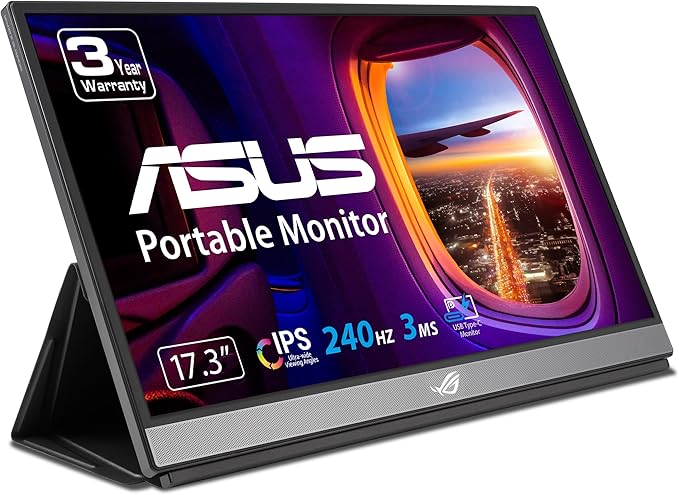
The Specs: 17.3″ 1080p IPS | 240Hz | 300 nits | 2.3 lbs | USB-C + Micro HDMI | 7800mAh battery
If you’re a serious competitive gamer on the go, this is your monitor. 240Hz is absolutely buttery smooth, and the massive 17.3″ screen means you’re not squinting at your game. The built-in 7800mAh battery gives you 3.5+ hours of unplugged gaming, and the Adaptive-Sync tech locks refresh rates to your GPU output. Yes, it’s heavy at 2.3 pounds, but the performance is worth the trade-off.
✓ Pros
- 240Hz refresh rate (buttery smooth)
- Large 17.3″ screen
- Built-in battery (3.5+ hrs)
- Adaptive-Sync support
✗ Cons
- Heavy at 2.3 lbs
- $400+ price tag
- 1080p for that much money
- Large screen less travel-friendly

The Specs: 15.6″ 1080p IPS | 60Hz | 250 nits | 2 lbs | USB-C (60W PD) + Mini HDMI | 10-point touch + stylus
The only portable monitor with true touchscreen and stylus support. Perfect for digital artists, designers, and note-takers who want their second screen to be interactive. 10-point touch is responsive, the stylus works great, and the 60W USB-C PD keeps your laptop charged while you create. The frameless design is chef’s kiss beautiful.
✓ Pros
- 10-point touch + stylus support
- 60W USB-C power delivery
- Frameless design
- Eye care technology built in
✗ Cons
- $320 for 1080p feels steep
- 60Hz only (no gaming)
- Heavier at 2 lbs
- Touch adds to price tag

The Specs: 24.5″ 2K QHD (2560×1440) IPS | 165Hz | 300 nits | 2.4 lbs | USB-C + Mini HDMI
If you want portable but don’t want to sacrifice screen size, this absolute unit delivers. 24.5 inches of 2K goodness at 165Hz means your productivity workspace is basically a desktop monitor experience, just in a slightly portable package. Ultra-slim 8.5mm design, VESA mountable, and 2K resolution that doesn’t feel cramped.
✓ Pros
- Massive 24.5″ screen
- 2K 165Hz combo
- Ultra-slim 8.5mm profile
- VESA mountable
✗ Cons
- 2.4 lbs is getting heavy
- $420 is expensive
- Less truly portable
- Overkill for pure travel
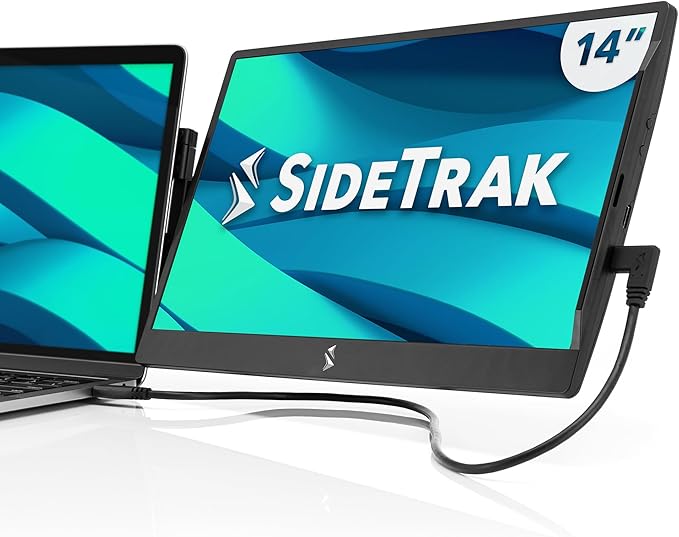
The Specs: 14″ 1080p IPS | 60Hz | variable nits | ultra-lightweight | USB-A or USB-C
SideTrak’s genius here is the swivel design—it attaches magnetically to your laptop screen and rotates. Ultra-portable for digital nomads and travelers who want a second screen without bulking up their carry-on. At around a pound, this is the lightest option we tested. Trade-off: 1080p and basic specs, but for $100, it’s unbeatable value.
✓ Pros
- Lowest price point ($100)
- Magnetic swivel design
- Ultralight and ultra-portable
- Works with most laptops
✗ Cons
- Basic 1080p specs
- Not for demanding tasks
- Swivel design adds bulk
- Limited by attachment method
⇒ Portable Monitor Buying Guide
Resolution vs. Portability
4K looks amazing, but 1080p is lighter. Consider what you’ll actually use it for—productivity doesn’t need 4K, but content creation and gaming want higher res. The sweet spot for most people is 1080p IPS, which balances weight, price, and usability.
Panel Types Explained
IPS panels have great colors and viewing angles—best for productivity. OLED has perfect blacks and insane contrast—best for creatives. TN panels are fast but narrow viewing angles. For portable monitors, IPS and OLED dominate. Choose based on your use case, not just hype.
Power & Connectivity
USB-C is the future. Most new portables support USB-C for power and display, meaning one cable does everything. Some have built-in batteries (bonus for gaming on planes), but most draw power directly from your laptop or need an external adapter. If you plan to work away from wall outlets, powering an external screen can drain your notebook rapidly; our best power banks guide highlights high-output portable batteries to keep mobile workstations running.
Refresh Rate for Gaming
60Hz is fine for work. 144Hz is smooth for competitive gaming. 240Hz is overkill for most people. If you game, get 144Hz minimum. For productivity, 60Hz is perfectly adequate—don’t pay extra for speed you won’t use. If you are building out a mobile battlestation, our best gaming keyboards guide covers responsive, travel-friendly keyboard options to match a high-refresh portable screen.
Single-Cable USB-C vs. Mini-HDMI Setup
A single USB-C cable only carries both video and power if your laptop port supports DisplayPort Alternate Mode (DP Alt Mode) or Thunderbolt / USB4. If your device has standard data-only USB-A ports or an HDMI output, you will need two cables: an HDMI cable for video signal plus a separate USB cable plugged into power.
Which portable monitor should you choose?
If you want the simplest productivity upgrade, start with the ASUS ZenScreen MB16ACV because this page lists it as the productivity pick with USB-C and USB-A support. If you play fast games, the ARZOPA Z1FC makes more sense because the comparison table lists it as the budget gaming option with a 144Hz IPS panel. If image quality matters more than refresh rate, compare the two OLED choices first: the ViewSonic VX1655-4K-OLED for 4K detail, or the INNOCN 15A1F OLED when you want OLED contrast at a lower listed price.
For travel, check weight and setup style before screen size. The SideTrak Swivel is the compact travel pick on this page, while the UPERFECT UMax gives you the largest listed screen but is less convenient for light carry-on use.
If you are connecting to a work laptop first, treat USB-C or USB-A support as the safer starting point than chasing 4K or 240Hz. This page lists the ASUS ZenScreen MB16ACV with USB-C and USB-A support, while the gaming and OLED picks trade that universal setup for higher refresh rate or richer contrast. Pairing a portable screen with a budget notebook? See our laptops under $600 guide before you buy the whole setup. If you take calls on the road alongside your secondary monitor, our best wireless earbuds for work calls guide covers headsets with reliable microphone noise cancellation.
Our Verdict
Best Overall: The ViewSonic VX1655-4K-OLED is the undisputed king if you have the budget. 4K OLED, under 2 pounds, and professional-grade color accuracy. It’s not cheap, but it’s the best portable monitor money can buy right now.
Best Value: The ARZOPA Z1FC is an absolute bargain at $140. 144Hz gaming performance at that price is unreal. If you’re on a budget, this is your pick.
Best for Creators: The INNOCN 15A1F OLED gives you OLED color quality at $170—massive savings compared to the ViewSonic. Perfect for designers and photographers who want accurate colors without breaking the bank.
Best for Productivity: The ASUS ZenScreen MB16ACV works with everything and is built for the office grind. Universal compatibility, solid build quality, and a reasonable price make it the productivity champ.
Bottom line: Portable monitors are no longer a novelty—they’re a legitimate productivity and gaming tool. Whether you drop $450 on OLED perfection or grab the $100 travel option, you’ll be amazed at how much a second screen improves your work life. Pick one based on your actual needs, not the specs that sound coolest on paper.
Disclosure: This article contains affiliate links to Amazon. We earn a small commission when you purchase through these links at no extra cost to you. This helps fund our testing and research. We only recommend products we genuinely believe are worth your money.
Last Updated: April 2026. Prices and availability are subject to change. Always check current prices and reviews on Amazon before purchasing.
Related Reviews
If you are building a portable work or travel setup, compare the monitor with nearby accessories too: our Bluetooth speakers guide, wireless earbuds for work calls guide, and laptops under $600 guide cover companion gear that affects the same desk, backpack, or home-office setup.
- The 8 Best Bluetooth Speakers of 2026
- The 8 Best Gaming Keyboards of 2026
- The 7 Best Laptops Under $600 in 2026 (Serious Power Without the Serious Price Tag)
- The 8 Best Power Banks of 2026 (Tested & Ranked)
- The 7 Best Projectors for World Cup 2026 Watch Parties
- The 7 Best Smartwatches of 2026 (Tested & Ranked for Every Wrist)