
The Free FIFA 2026 Ticket Scanner for Chrome — by TheGreatReviewer
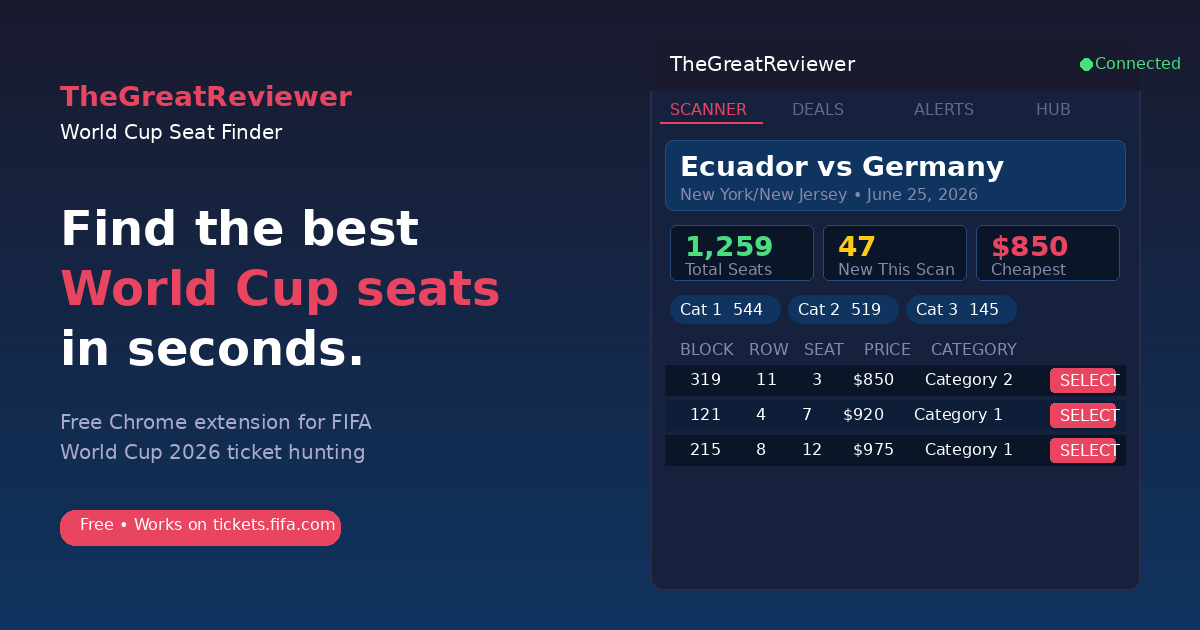
The free FIFA World Cup 2026 ticket finder Chrome extension that scans FIFA’s official resale marketplace for the cheapest seats across all 104 matches — no more manual scrolling through hundreds of listings.
What’s New in v1.4.1
Accessible-seat filtering, redesigned Hub tab, and a memory-leak fix — wheelchair and easy-access seats now have their own dedicated mode so they never pollute cheapest-seat stats, the Hub links straight to the live price tracker plus all 16 host city guides, and long scanning sessions no longer crash. Already installed? Chrome will auto-update you. New here? Grab it free.
Accessible & Wheelchair Seat Filtering
- NEW “♿ Accessible Seats” Toggle in the Scanner A new toggle now sits above the category chips. By default the Scanner hides wheelchair, easy-access, companion, and accessible-category seats so they never inflate availability counts or pollute the cheapest-seat stat for standard attendees. Click the toggle to flip into Accessible mode and view only accessible inventory.
- NEW Every Stat Respects the Toggle The seat table, row count, cheapest-price stat, category chips, category dropdown, and CSV export all switch with the toggle. Flip modes and every number on the page updates to match.
- NEW “Include Accessible Seats” Checkbox in Alerts A new opt-in checkbox in the Create Alert form (off by default) lets you choose whether wheelchair and accessible-category seats can trigger your price, new-seat, or price-drop alerts. Standard attendees can leave it off; users who need accessible seating can opt in.
Email Alerts — Now Front & Center
- NEW “Just Added — Email Alerts” Banner in the Alerts Tab A prominent banner at the top of the Alerts tab highlights the email-alerts feature so users updating from older versions don’t miss it. Enter your email when creating an alert and you’ll get notified even when the extension isn’t open.
- NEW Pulsing “NEW” Badge on the Alerts Tab A small red pulsing NEW badge on the Alerts tab button draws attention to the email feature for users on v1.3.x or earlier who missed it.
Hub Tab — Fully Redesigned
- NEW Live Seat & Price Tracker Tile A new gold hero tile at the top of the Hub tab links directly to the public Live Ticket Price Tracker showing real-time resale prices and seat availability across all 16 venues. Pulsing green “LIVE DATA” indicator included.
- NEW All 16 Host City Travel Guide Tiles Every FIFA World Cup 2026 host city now appears as a tap-to-open grid organized by country (🇺🇸 USA × 11, 🇨🇦 Canada × 2, 🇲🇽 Mexico × 3), each linking directly to its dedicated travel guide on TheGreatReviewer.com.
Bug Fixes
- FIXED No More Crash After 40+ Scans A memory leak that built up over a long scanning session would crash the extension after roughly 40 matches scanned in a row. The Scanner now releases scan history more aggressively and uses memory carefully — you can scan all 104 matches in one session without issue.
World Cup Seat Finder is a free Chrome extension and FIFA 2026 ticket scanner that finds the cheapest FIFA World Cup 2026 resale tickets in seconds. This free FIFA seat finder scans all 104 matches across 16 host cities on FIFA’s official resale marketplace so you can find cheap World Cup 2026 tickets without manual scrolling.
World Cup Seat Finder: Free FIFA 2026 Ticket Scanner Chrome Extension
v1.3.1 — Email Alerts
Email Alerts & bug fixes — get notified about matching seats even when your browser is closed, with full server-side monitoring and per-match controls. Already installed? Chrome will auto-update you. New here? Grab it free.
Email Alerts
- NEW Get Notified by Email Enter your email when creating an alert and receive seat notifications directly in your inbox — even when your browser isn’t open. Includes double opt-in confirmation for your security.
- NEW Server-Side Monitoring Our server checks for matching seats every 10 minutes around the clock. You don’t need Chrome open, the extension running, or even your computer on — if a seat drops below your price, we’ll email you.
- NEW Per-Alert On/Off Toggle Pause email notifications for a specific match with one click, without affecting any of your other active alerts. Toggle it back on anytime to resume instantly — no re-confirmation needed.
- NEW Multiple Independent Match Alerts Set separate email alerts for different matches, each with its own price threshold, category filter, and toggle. They run completely independently of each other.
- NEW One-Click Unsubscribe Every alert email includes an unsubscribe link in the footer. Click it to permanently cancel that alert — no login required, no hoops to jump through.
Bug Fixes
- FIXED No More $0 Seat Alerts Some users saw $0 seats appearing in their alerts and scanner. These were incorrectly picked up from FIFA’s “Last Minute Sales” portal rather than the resale marketplace. The tool now exclusively tracks resale seats and ignores $0 entries entirely.
v1.2.0 — Alerts Overhaul
Alerts framework overhaul — the full seat table now appears inside the extension when any alert fires, “All Matches” alerts work across every game independently, and duplicate alert cards are gone for good. Already installed? Chrome will auto-update you. New here? Grab it free.
Alert Hit Details
- FIXED Full Seat Table on Alert Fire When an alert triggers, the Alerts tab now shows a complete table of every matching seat — block, row, seat number, price, category, and markup — with a “→” Select button on each row to jump directly to that seat on the map.
- FIXED All Matches Show in Alert Results Alert hits from every match now accumulate in the Alerts tab. Previously only the first match that triggered would appear — now each match gets its own card with the latest matching seats.
Smarter Alert Logic
- FIXED “All Matches” Alert Now Works for Every Game Setting an alert to “All Matches” now fires independently for each match you scan. Opening Ecuador vs Germany then Colombia vs Uzbekistan will trigger the alert for both — no more creating a separate alert per game.
- FIXED No More Duplicate Alert Cards Each rescan used to stack a new duplicate card on the Alerts tab. Now each match gets one card that refreshes in place with the latest seats — no more scrolling through repeated results.
Notifications & Sound
- FIXED Persistent Browser Notifications Alert notifications now stay on screen until you dismiss them — they no longer disappear after a few seconds before you can read them.
- FIXED Alert Sound Works When Popup is Closed The audio ping now plays reliably even when the extension popup isn’t open, so background rescans can wake you up when a deal appears.
v1.1.0 — 13 New Features
Smarter scanning, upgraded alerts, wishlist, markup calculator, and more.
Smarter Scanning
- v1.1 Auto Re-Scan Timer Set the extension to automatically re-scan every 2, 5, or 10 minutes while the page is open.
- v1.1 Background Re-Scan Keeps scanning even when the popup is closed — runs as a background alarm every 5–30 minutes.
- v1.1 Scan History Log Live ticker shows “Last scanned 3m ago · 1,259 seats · Prev: 1,244 (+15)” so you can watch inventory move in real time.
Filtering & Pricing
- v1.1 Min Price Filter Skip the cheap nosebleeds and zero in on the category you actually want.
- v1.1 Sort Controls Click any column header — Block, Row, Seat, Price — to sort ascending or descending.
- v1.1 Markup Calculator Every seat now shows % above FIFA face value (+48%, +210%, etc.) color-coded green → amber → red.
Deals Tab
- v1.1 Best Blocks for Groups Ranks which blocks have the most consecutive available seats — group buyers know exactly where to look.
- v1.1 Per-Category Price Trend Graph The sparkline now draws a separate color line per category so you can track Cat 1 vs Cat 3 movement independently.
Alerts (v1.1 Foundation)
- v1.1 New Seat Alert Get notified the moment any new seat appears in a specific block — regardless of price.
- v1.1 Price Drop Alert Fires when a category’s minimum price drops between scans.
- v1.1 Alert Sound & New Seat Highlighting Optional audio ping on trigger; seats new since last scan glow green in the table.
Wishlist / Watchlist
- v1.1 Save Seats Star any seat to add it to your personal Watchlist. The Watchlist sub-tab shows each saved seat as Available (green) or Gone (red/faded) — so you know instantly if your target is still there after every rescan.
What World Cup Seat Finder Does
Six powerful features that turn FIFA’s clunky resale marketplace into your personal deal-finding machine.
Auto-Scanner
Scans entire stadiums automatically, tile by tile. Every section, every row, every seat — mapped and priced in minutes instead of hours.
Group Deal Finder
Going with friends? Find 2–4 consecutive seats together at the best combined price. No more splitting your group across different sections.
Price Alerts
Set your target price for any match and category. When you scan and a price drops below your threshold, you get an instant browser notification so you can grab it before anyone else.
Price History
Track price trends with sparkline charts. See whether prices are rising or falling so you can time your purchase perfectly.
Smart Recommendations
AI-powered best-value picks that factor in seat location, price, and view quality. Get the best bang for your buck, instantly.
Export & Share
Download scan results as a CSV spreadsheet or share the best deals directly with friends via a shareable link.
How It Works
Three steps. Under two minutes. That’s it.
Install the Extension
Add TheGreatReviewer World Cup Seat Finder to Chrome from the Chrome Web Store. One click, no sign-up required.
Scanning Starts Automatically
The extension instantly maps every available seat and price in the stadium — no buttons to click.
Inside the Extension
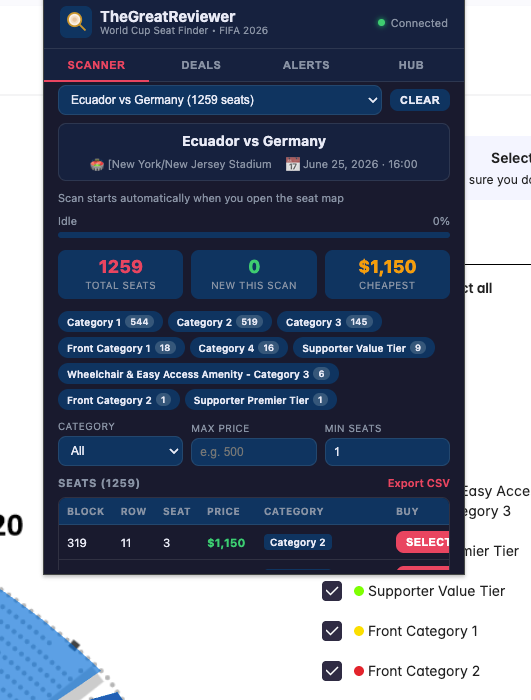
Four tabs, one mission: find you the cheapest World Cup tickets.
Full Stadium Scanner
The main powerhouse. Select a match, hit scan, and watch the progress bar as the extension checks every section of the stadium. Results appear in a sortable table showing section, row, seat numbers, and price.
Real-time ProgressBest Deals Dashboard
AI-curated picks sorted by value score. Each deal card shows the price, section, a “value rating” (1–10), and a direct link to buy on FIFA’s site. Filter by budget, category, or group size.
AI-PoweredPrice Alert Manager
Set price thresholds for specific matches. When a resale ticket drops below your target, you get a Chrome notification with a direct link. Manage all your active alerts in one place.
Push NotificationsWorld Cup Guides
Quick access to all of The Great Reviewer’s World Cup 2026 content — ticket buying guides, travel tips, match schedules, packing lists, gear reviews, and group predictions. Everything you need in one place.
7 GuidesFrequently Asked Questions
Everything you need to know before installing.
More World Cup 2026 Guides
Plan your entire World Cup experience with our complete guide collection.
Ready to Find Cheap FIFA World Cup 2026 Tickets?
Install TheGreatReviewer World Cup Seat Finder and start finding cheap tickets across FIFA’s resale marketplace. It’s free, it’s fast, and it’ll save you hours of manual searching.
📥 Install from Chrome Web StoreShopping for gear beyond the tournament? Visit The Great Reviewer product reviews and buyer guides for practical comparisons before you buy.